
Why Is Your Website Not Bringing In Customers? 10 Things to Check
A website that gets visitors but no inquiries is usually leaking in one of ten places. We explain what each one costs you, how to check it yourself without technical access and what to fix first.
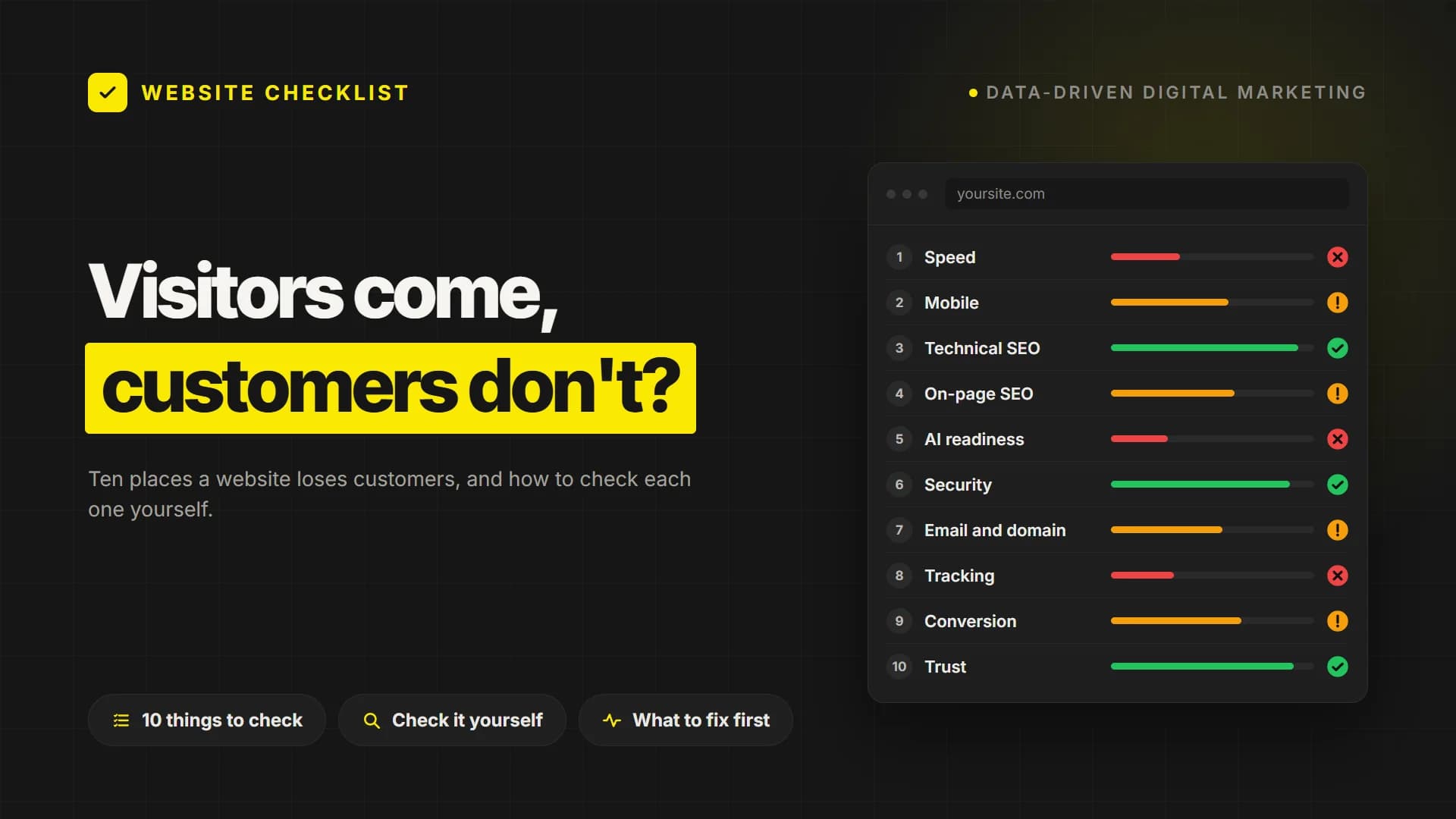
Short answer: A website usually fails to bring in customers for one of ten reasons: it loads slowly, works poorly on phones, cannot be found or understood by search engines and AI assistants, looks unsafe, loses its own emails, measures nothing, hides the next step or does not look trustworthy. Each one can be checked from the outside in minutes.
The site is live, the ads are running, people do visit, and still the phone stays quiet. In most cases the problem is not the design. It is a handful of small leaks, each one costing you a few visitors, that add up to an empty inbox. Below are the ten places we look at first, what each one costs you when it is broken and how you can check it yourself without any technical access. If you would rather see all ten at once, PumpAudit scans your site for free and scores each of them in about two minutes.
10 places a website loses customers
1. Speed: do visitors wait or leave?
What it costs you: Every extra second of loading sends some visitors back to the search results before they have seen your offer. Slow pages also weigh on rankings, because Google uses page experience signals such as Core Web Vitals.
How to check it yourself: Open your homepage on a phone using mobile data, not office Wi-Fi. Then run the address through Google PageSpeed Insights. If the main content takes longer than 2.5 seconds to appear, speed is costing you customers.
2. Mobile and accessibility: can everyone use the site?
What it costs you: Most visits now come from phones. If buttons are too small to tap, text is hard to read or a form is awkward to fill in, visitors leave without telling you why.
How to check it yourself: Go through your own site on a phone with one hand: find a service, read a paragraph, send the contact form. Anything that makes you pinch, zoom or retype is a leak.
3. Technical SEO: can Google find your pages?
What it costs you: If Google cannot crawl or index a page, that page does not exist for anyone searching. One wrong line in robots.txt or a stray noindex tag can hide a whole site.
How to check it yourself: Type site:yourdomain.com into Google and see how many pages appear. Compare that with the number of pages you actually have. A large gap means pages are blocked or ignored. Our step-by-step website audit guide shows how to dig deeper.
4. On-page SEO: does your result earn the click?
What it costs you: The title and description are your ad in the search results. If every page carries the same title, or the title simply says Home, you can appear in the results and still not earn the click.
How to check it yourself: Search for your own services and read your result as a stranger would. Does it say what you do, where and for whom? If impressions rise while clicks stay flat, this is usually where the gap is.
5. AI readiness: can ChatGPT recommend you?
What it costs you: More and more buyers ask ChatGPT, Gemini or Perplexity for a recommendation before they open a search engine. If these assistants cannot read your site, or find no clear answers on it, they cite someone else.
How to check it yourself: Ask an AI assistant what your company does and who it serves. A vague or wrong answer usually means your pages lack clear statements, question and answer sections or structured data, or that AI crawlers are blocked.
6. Security: does the browser trust your site?
What it costs you: A browser warning that says Not secure ends the visit on the spot. Outdated software and missing security settings also leave the site open to attacks that can take it offline or fill it with spam.
How to check it yourself: Check that your address opens with https and a padlock, including the pages with forms. Ask whoever maintains the site when its software was last updated. If nobody knows, that is your answer.
7. Email and domain: do your replies arrive?
What it costs you: Your site may be doing its job while your replies land in spam. Without SPF, DKIM and DMARC records, mailbox providers trust your domain less, and anyone can send fake emails in your name.
How to check it yourself: Send a quote from your company address to a personal Gmail account and see where it lands. Also check when your domain expires. An expired domain takes the site and every mailbox down with it.
8. Tracking: do you know where inquiries come from?
What it costs you: If you do not know which channel brings inquiries, you cannot tell which spend works. Budgets then follow gut feeling, and the channel that really pays for itself is often the first to be cut.
How to check it yourself: Can you say how many inquiries came from the site last month, and from which source? If the answer takes more than a minute or is a guess, tracking is missing or broken.
9. Conversion: is the next step obvious?
What it costs you: Visitors decide within seconds whether to stay. If the first screen does not say what you offer and what to do next, even well-targeted traffic leaves without a trace.
How to check it yourself: Show your homepage to someone outside the company for five seconds and ask two things: what does this company do, and what would you click? Then count the steps it takes to reach you by phone, form or WhatsApp.
10. Trust and legal presence: do you look like a real business?
What it costs you: People buy from companies that look real. No address, no about page, no reviews and no privacy or cookie notice make a site look abandoned, and cautious buyers move on.
How to check it yourself: Look for a visible address, a real about page, customer references and privacy and cookie notices. This is a check of what visitors can see, not legal advice.
See all ten in two minutes
Checking these by hand takes an afternoon. PumpAudit, our free website audit tool, does it in about two minutes: it scans your site across these 10 layers with 95 checks and gives a score out of 100, with the most important problem in each layer shown right away. No sign-up is needed. The score is PumpAudit's own method, not a rating from Google.
What to fix first
Do not try to fix everything at once. Start with whatever blocks visitors completely: a site that cannot be indexed, a security warning, a form that does not send. Then move on to speed and the first screen, and only then to the finer points. If you would like this handled for you, get in touch: we do the work ourselves, from the technical fixes to the content and the tracking.
Frequently Asked Questions
Why does my website get visitors but no inquiries?
A website gets visitors but no inquiries when the visit breaks down somewhere between arrival and contact. The usual causes are slow loading on phones, a first screen that does not say what to do next, a form that is hard to complete and a lack of visible trust signals such as an address or reviews.
How can I check my website myself without technical knowledge?
You can check most of it from the outside: open the site on a phone using mobile data, search for your own services on Google, send yourself an email from the company address and try your own contact form. A free tool such as PumpAudit runs the same checks automatically and scores them.
Which website problem should I fix first?
Fix first whatever stops visitors or search engines completely: pages that cannot be indexed, security warnings and broken forms. Speed and the clarity of the first screen come next, because they affect every visitor. Finer points such as heading structure can wait until the basics are in place.
Your site may look great. Does it actually work?
PumpAudit scans your site across 10 layers and 95 checks: speed, SEO, AI visibility, security, email and conversion. Your score is free and takes a minute or two.