
How to Do a Website Audit: A Step-by-Step Guide
A website audit is a systematic check to find out why a website is not delivering the results you expect. We explain how to do one in seven steps, from measurement and indexing to speed, AI visibility and lead tracking, and how to prioritise the findings.
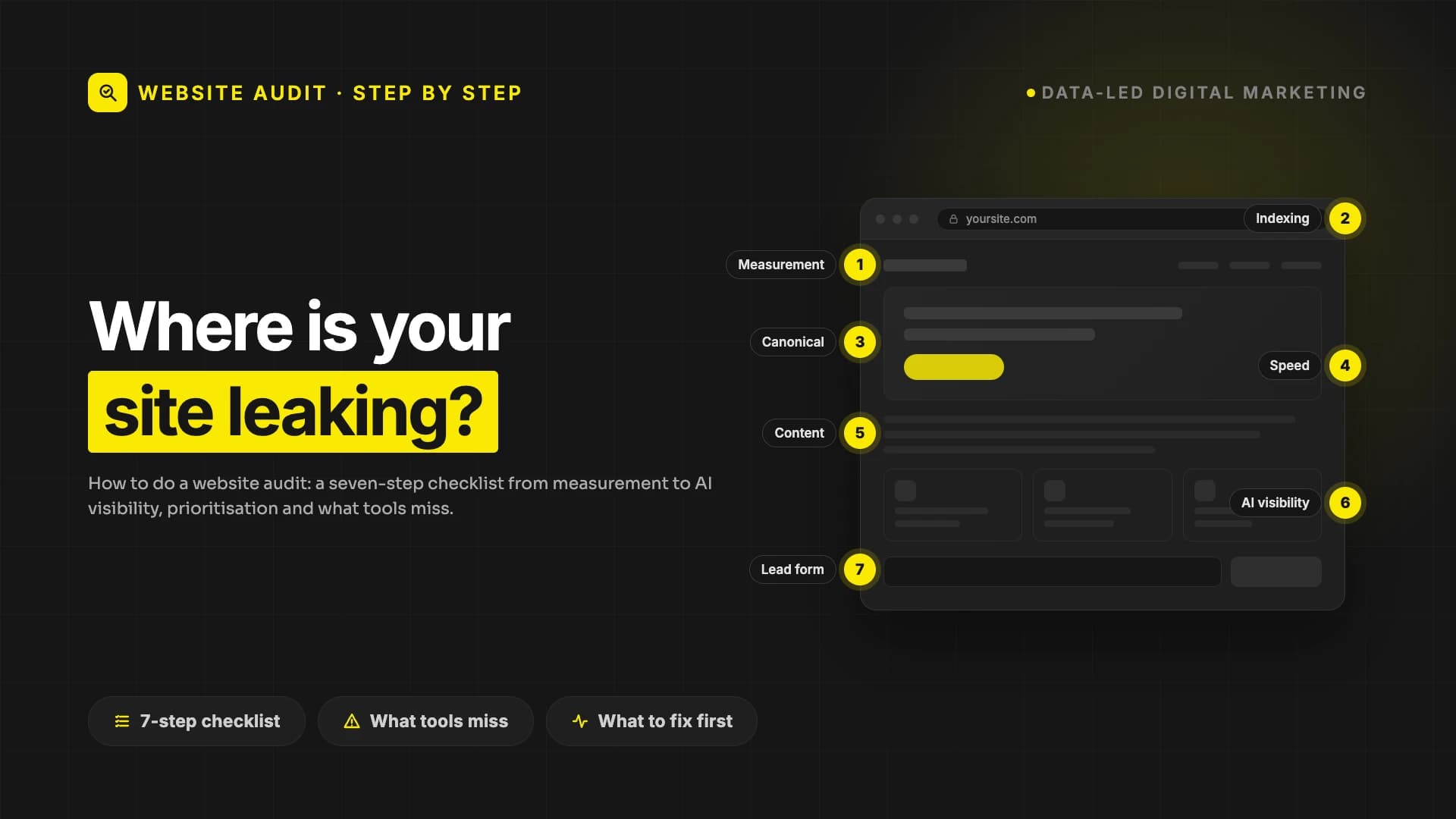
A website audit is a systematic check to find out why a website is not bringing in the traffic, visibility or leads you expect. Measurement, indexing, technical health, speed, content, AI visibility and conversion are reviewed step by step, and at the end you have a prioritised list of work.
The real output of a good website audit is not a score but a decision: what should you fix first, and what will that fix get you? In this post we walk through a seven-step checklist, how to prioritise the findings, where free tools fall short and which findings to tackle first.
When should you do a website audit?
Reviewing a site from top to bottom at least once a year is a good habit. But what really sets the timing is running into one of these situations:
- Organic traffic or leads have dropped for no obvious reason.
- The site is about to be redesigned or moved to a new platform (audit both before and after).
- You want to know whether the site can handle incoming visitors before you increase your ad budget.
- You are starting to work with a new agency or a new team and need a shared starting point.
- Your impressions are rising, but clicks and leads are standing still.
That last one is more common than you might think. We explain why it happens in detail in our post on data-driven SEO strategy.
How to do a website audit: a 7-step checklist
Order matters. If measurement is wrong, the findings of every later step will be wrong too; if the site is not indexed, nobody will see your speed improvements. So work through the list from top to bottom.
1. Measurement: can you trust your numbers?
Start the audit not with the site itself but with the tools that measure it. Are Google Analytics and Google Search Console set up correctly, are they measuring the same site, and how does cookie consent affect measurement? The two tools do not count the same thing, so their numbers are not expected to match exactly. But if clicks in Search Console are clearly higher than organic sessions in Analytics, something is wrong with your measurement; do not make any other decision until you find the cause. An audit of a site that is measured incorrectly will prioritise the wrong work.
2. Indexing: can Google see your pages?
The Page indexing report in Search Console shows which of your pages Google has indexed and which it has left out, and why. Check three things here:
- Are any of your important pages in the "not indexed" groups?
- Is robots.txt or a noindex tag accidentally blocking a section of the site?
- Does your sitemap contain only live, non-redirected URLs that you want indexed?
Two statuses in the report raise the most questions. "Crawled: currently not indexed" means Google has crawled the page but not indexed it. If important pages sit in this group, you need to set them apart from similar or low-value pages and strengthen them. "Discovered: currently not indexed" means Google knows the URL but has not crawled it yet; according to Google, this usually happens when crawling was postponed because it was expected to overload the site.
3. Technical health: redirects, duplicates and canonicals
This step checks whether the site tells Google a single, consistent story:
- Redirects: Do old URLs go to the right new URL with a 301, and are there any redirect chains?
- Broken pages: Do internal links lead to pages that return a 404?
- Duplicate pages: Is the same content available at more than one URL (parameterised URLs, old short links)?
- Canonical tag: Does every page correctly point to its own canonical URL?
There is one canonical detail that often gets missed: Google only accepts the canonical tag when it is in the <head> section of the page (Google's guide to duplicate URLs). Even if the tag appears to be on the page, it is ignored if it has ended up in the body.
4. Speed and Core Web Vitals
Google calls these three metrics Core Web Vitals, and the thresholds it considers "good" (web.dev) are:
- LCP (Largest Contentful Paint): How long it takes the main content of the page to load. 2.5 seconds or less.
- INP (Interaction to Next Paint): How quickly the page responds to clicks and taps. 200 milliseconds or less.
- CLS (Cumulative Layout Shift): Unexpected shifting of elements while the page loads. 0.1 or less.
A page passes when it meets all three thresholds for 75% of page loads. A high score in a lab test is not enough; the Core Web Vitals report in Search Console shows real user data. Start with the page templates that get the most visits: fixing a single template improves hundreds of pages at once.
5. Content and search intent
In this step, the query and page data in Search Console are read together:
- Impressions but no clicks: The page ranks, but its title and description may not answer the intent behind the search.
- Several pages for the same query: Your pages are competing with each other and none of them can get ahead.
- Thin or outdated content: Pages that repeat the topic without adding new information, experience or data.
Every important query should have a single owner on the site. Pages covering the same topic are merged, and the rest are 301 redirected to the strongest page.
6. AI visibility
Your customers no longer ask their questions only on Google; they also ask ChatGPT, Gemini, Perplexity and Google's AI Overviews. This step looks at whether your brand is mentioned in questions about your industry, whether your pages give a clear, quotable answer to the question, and whether your structured data and brand information are consistent. We cover this step by step in our hands-on GEO guide.
7. Conversion and lead tracking
Visitors have arrived, but are they turning into leads, and whose desk do those leads land on? The final step tests forms, phone and WhatsApp buttons, thank-you pages and ad conversions. It also checks whether incoming leads reach your CRM along with their source. A company that cannot see where its leads come from ends up guessing which channel to invest in. You will find ways to increase your conversion rate in our post on CRO tactics.
What do free tools show, and what do they miss?
Free SEO audit tools are a good starting point. They list broken links, missing meta descriptions and slow pages within minutes. But there are three things they cannot do:
- They don't know the context. The same warning is critical on one site and trivial on another.
- They don't prioritise. They give you a list hundreds of lines long, but they don't tell you which items affect your leads.
- They don't look beyond the site. Ad setup, the leads flowing into your CRM and visibility in AI assistants are outside the scope of most tools.
That is why a tool's output is the raw material of an audit, not its conclusion.
How should you prioritise the findings?
Weigh each finding with two questions: how much impact will fixing it have, and how much effort will it take? High-impact, low-effort work goes to the top. In practice, splitting this into two time frames works well:
- First 30 days: Measurement errors, issues blocking indexing, broken redirects, problems with lead forms.
- First 90 days: Speed improvements, merging competing content, writing about missing topics, AI visibility work.
Next to every finding, write the answer to "what will change once this is fixed?" A finding without an answer is just a warning taking up space on the list.
Frequently asked questions
Is a website audit the same as an SEO audit?
An SEO audit is one part of a website audit. On top of search visibility, a website audit also covers measurement, speed, ad setup, AI visibility and lead tracking.
How long does a website audit take?
It depends on the size of the site. For a small or medium-sized corporate site, collecting the data, reviewing it and prioritising takes a few working days. What takes the time is not the tool scan but interpreting the findings.
Can I do a website audit myself?
Yes. Search Console, Google Analytics and PageSpeed Insights are free and cover most of the steps in this post. The hard part is prioritising the findings and telling which ones actually affect your leads.
How often should you do a website audit?
A full audit at least once a year, plus a quick monthly look at Search Console and your speed reports, is enough. During a migration, a redesign or a major drop in traffic, though, do one straight away.
What happens after the audit?
The output of a good audit is a roadmap with a clear owner and date for every item. That roadmap can be carried out by your own team, by an agency or by both together.
Next step
Start applying this list from the first step, measurement: every decision you make without trusting your numbers is a guess. If you would like us to do the same work for you, PumpAudit reviews your site across website and performance, SEO and AI visibility, performance marketing, social media and content, and CRM, data and automation, and gives you a 30-day and 90-day roadmap.
Your site may look great. Does it actually work?
PumpAudit is the AI assisted auditor built by Pumpmedya. It analyses your site across five areas, every finding is checked by a specialist, and the report is with you within 3 working days. Credited against your first project.
See PumpAudit